Help and FAQ - ViboraMatch
What is ViboraMatch?
ViboraMatch helps you automate the creation and pairing of your padel tournament.
Automating your padel tournament through an online platform turns a complex management task into a smooth, error-free process. By importing your pair lists directly (Excel or CSV), you eliminate tedious manual entry and the risk of omissions. The system instantly calculates team weights and automatically generates the optimal number of groups, while intelligently handling byes to balance brackets fairly.
Once the groups are created, you can print them in one click for physical display, while players check results and standings in real time on their phones. This centralized data offers full transparency and lets the organizer focus on the club atmosphere rather than last-minute math.
TDL and TEE: can you handle them?
Of course! 😉
In padel, TDL and TEE refer to two tournament draw formats used by the FFT:
- TDL — Straight-entry Draw
- TEE — Staggered-entry Draw
Key difference
TDL (Straight-entry Draw)
Everyone starts at the same round.
Example:
16 teams → everyone starts in the round of 16
➡️ This is the "classic" single-elimination format.
Advantages:
- easy to understand
- quick to organise
- fair: everyone plays the same number of rounds to win
Disadvantage:
- top pairs may face weaker opponents right from the start
TEE (Staggered-entry Draw)
The best teams ("seeds") enter the draw later in the tournament.
Example:
some teams start in a pre-round → seeded teams enter directly at the quarter-final or semi-final stage
➡️ The aim is to protect the strongest pairs and balance the level of play.
Advantages:
- prevents top seeds from meeting each other too early
- useful when there is a significant gap in levels
Disadvantages:
- some teams play more matches than others
- may seem less "fair" for players who start earlier in the draw
How do I import my players?
The system can read .csv and Excel (.xlsx) files for quick and error-free integration of your pair lists. Go to the "Importation" tab, select your file in the required format and click "📤 Import".
I have an improvement request
Use the page contact
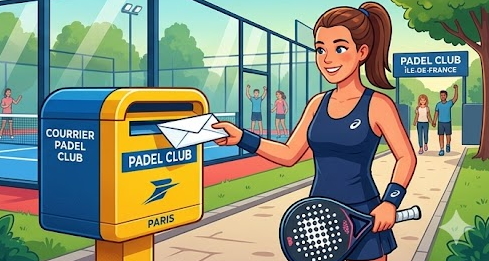
What are the prices?
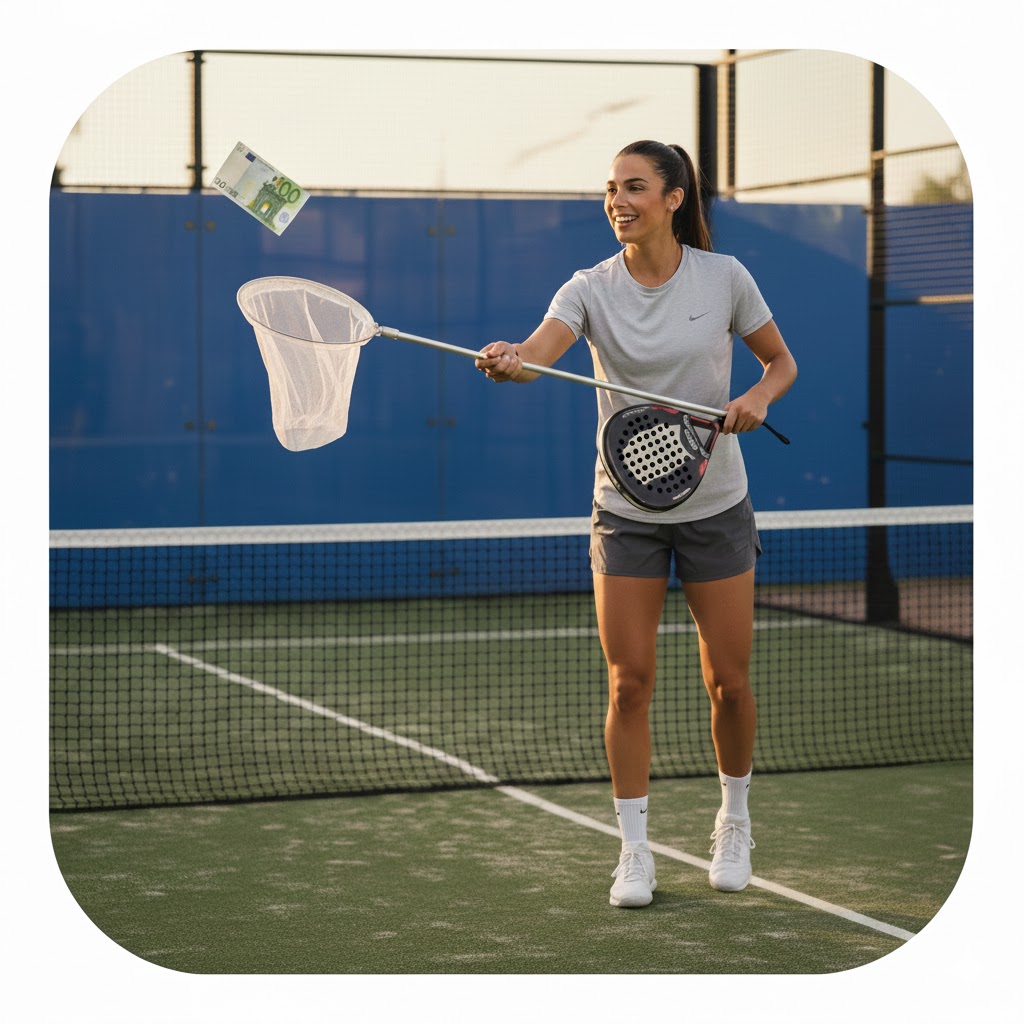
Pricing grid... Really? 😃

Why are registrations limited to 50?
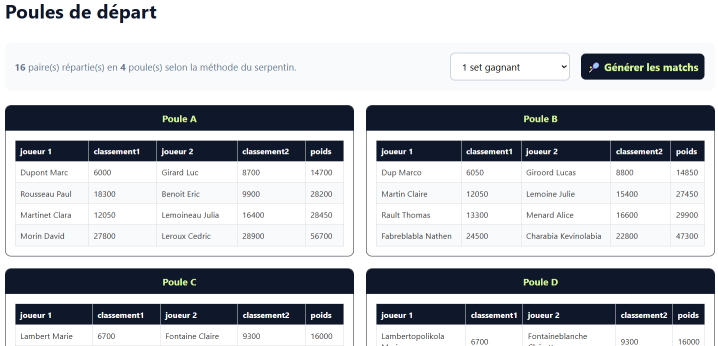
How many groups and how many seeded pairs suggested?
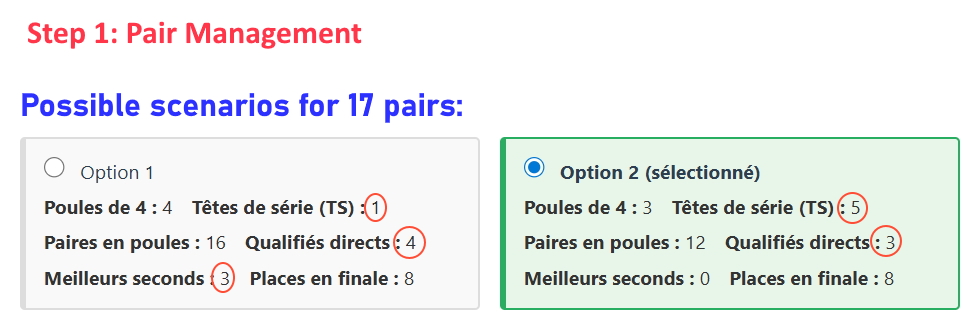 (Note: in some cases it is mathematically impossible to have a quarterfinal with 8 groups. That is why the setup ends up with 16 final groups instead of 8)
Viboramatch uses the "snake" method or the draw-by-levels method (hats / pots): you choose. Example for the snake method: 4 groups of 4 pairs, ranked by descending weight from 1 to 16, and placed in the following required order:
| [A] | [B] | [C] | [D] |
|---|---|---|---|
| 1 | 2 | 3 | 4 |
| 8 | 7 | 6 | 5 |
| 9 | 10 | 11 | 12 |
| 16 | 15 | 14 | 13 |
Testing match scoring takes forever!
You said it! Entering dozens of scores just to test is really tedious.
Luckily there is a handy way to ask the system to fill in scores automatically.
Add &test=true to the URL of the page that shows the matches, for example:
https://viboramatch.com/index.php?page=matchdepart&test=true
This shows a red “TEST” button in front of the groups to fill in all scores automatically!

I have a partnership proposal
Use the page contact

And to see octopuses playing padel?
What criteria are used for group seeding?
Pairing uses the pair's weight (ranking) to ensure the best pairs do not meet in the first round (seeded system).

How are ties in a group broken?
Here is exactly how ties are broken in the code (group standings).
1) Number of wins (highest first).
2) Set difference = sets won - sets lost.
3) Game difference = games won - games lost.
4) Head-to-head if still tied on the 3 criteria.
Cuts for tournaments
For Women's and Men's Seniors and Seniors+ tournaments, cuts have been introduced to level the playing field in P 25 to P 250 tournaments inclusive.
For P 500 / P 1000 / P 1500 and P 2000 tournaments, no ranking limit.
Lists are closed based on pair weights.
| Events | Men | Women | Mixed | Youth |
|---|---|---|---|---|
| P 2000 | OPEN (subject to cut) | OPEN (subject to cut) | No event | No event |
| P 1500 | OPEN (subject to cut) | OPEN (subject to cut) | No event | No event |
| P 1000 | OPEN (subject to cut) | OPEN (subject to cut) | No event | No event |
| P 500 | OPEN (subject to cut) | OPEN (subject to cut) | No event | No event (except TNJ) |
| P 250 | FORBIDDEN FOR TOP 800 inclusive | FORBIDDEN FOR TOP 100 inclusive | No ranking limit | No ranking limit |
| P 100 | FORBIDDEN FOR TOP 3.000 inclusive | FORBIDDEN FOR TOP 300 inclusive |
FORBIDDEN TOP 3.000 Men inclusive TOP 300 Women inclusive |
No ranking limit |
| P 50 | FORBIDDEN FOR TOP 10.000 inclusive | FORBIDDEN FOR TOP 1.000 inclusive |
FORBIDDEN TOP 10.000 Men inclusive TOP 1.000 Women inclusive |
No ranking limit |
| P 25 | FORBIDDEN FOR TOP 30.000 inclusive | FORBIDDEN FOR TOP 3.000 inclusive |
FORBIDDEN TOP 30.000 Men inclusive TOP 3.000 Women inclusive |
No ranking limit |
What is the score format?
You choose to configure the scores according to your needs.
Here are the official formats:
| Format | Match structure | Decisive point (No-Ad) | Tournament categories (Common uses) |
|---|---|---|---|
| A1 / A2 | 3 sets to 6 games | A2 only | P500, P1000, P1500, P2000 (Final rounds) |
| B1 / B2 | 2 sets to 6 games + Super TB | B2 only | P100, P250, P500 (Competition standard) |
| C1 / C2 | 2 sets to 4 games + Super TB | C2 only | P25, P50, P100, Youth and Senior+ |
| D1 / D2 | 1 set to 9 games | D2 only | P25, Consolation, Ranking matches |
| E | 1 Super Tie-break (10 pts) | No | P25, Activities, End of brackets |
| F | 1 set to 4 games | Yes | P25 Flash, Youth tournaments, Consolation |
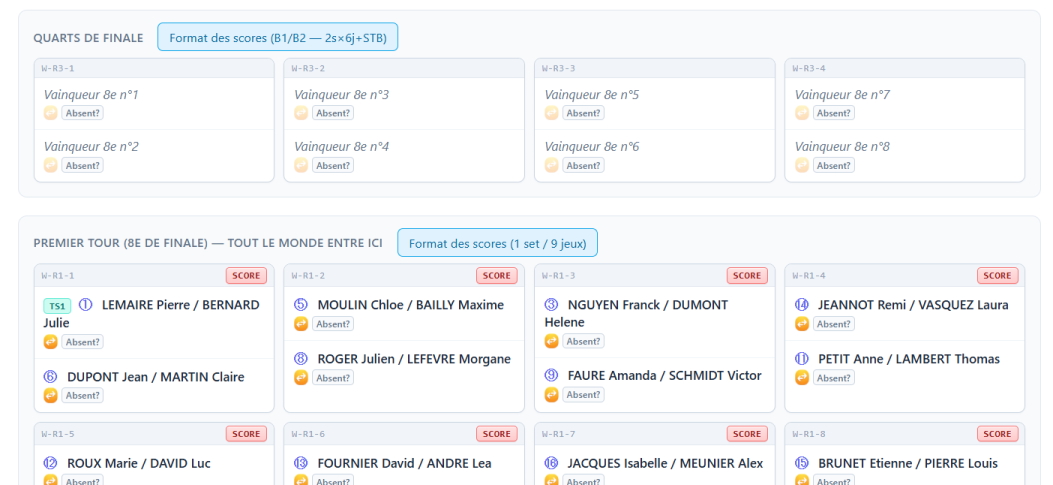
What about TDL (tableaux à départ en ligne) brackets?
ViboraMatch supports straight-line seeding brackets (TDL).
The TDL is organised as a single bracket for 8, 16 or 32 pairs.
All pairs start in the main bracket.
After each match, teams continue through ranking matches or a consolation bracket.
Opponents therefore evolve based on results.
Characteristics:
• Simple structure, quick to set up
• Direct progression in one bracket
• Gradual adjustment of match level
• Initial draw may create level gaps in round 1
Prefer this format when:
• time available is limited
• you want simple organisation
• you want a fluid format with quick back-to-back matches
What about player registrations?
2 approaches are possible: with Stripe (explained here), which takes a small commission, and with HelloAsso (explained further down), which is free.
If you are hesitating, I offer a detailed comparison further down in the FAQ
Viboramatch could offer to handle registrations for you, but that would cost you the management fees that come with such a service and, personally, I think it is healthier for the money to be handled directly by the padel club, as transparently as possible.
The procedure is quite simple.
If you are not comfortable with office tools, one of your members will certainly know how and will be happy to help!
Here is a low-cost walkthrough, to be adapted to your needs, which will make you completely self-sufficient
1. Create the Stripe payment link (Stripe | Online payment platform and solution)
In the Stripe dashboard, go to Payment links > Create.
- Create a product such as "Padel tournament registration, one player's share" with the amount per person.
- Enable Collect name and add a custom field "Your team / partner name". That is what will let you match a payment with a registration.
- You can also enable Limit the number of payments (for example 2 × the maximum number of teams) to close registrations automatically once you are full.
- Copy the generated link.
Since each player pays their own share, there are two options:
- Two separate payments: each player pays through the same link, stating the team name.
- Adjustable quantity (1 or 2): one player can pay for both if they wish.
2. Create the Google Form
Questions to include:
- Last name, first name, e-mail, licence number and phone (WhatsApp) of player 1
- Same for player 2
- Acceptance of the rules (cancellation, refund, GDPR)
In Settings, turn on e-mail address collection. In Responses, click the Sheets icon to link the form to a Google Sheet for managing registrations.
3. Send the Stripe link after registration
- Simple version: in Settings > Presentation, edit the form's confirmation message: "Thank you! To confirm your registration, each player pays their share here: [Stripe link]." The player sees the link as soon as they submit the form.
4. Track the payments
- In Stripe > Settings > E-mails, turn on successful payment notifications so you are told about every payment received.
- The Stripe > Payments dashboard lists everything (name, e-mail, licence number, etc.).
- In your Google Sheet, add Paid P1, Paid P2 and Confirmed (yes/no) columns that you tick by cross-checking with Stripe.
5. Confirm on WhatsApp
Once both shares are paid, send a message to the players (or create one group per tournament). For example: "Hello [first name], we have received both payments, your team [name] is confirmed for the tournament on [date]. See you at [venue] at [time]."
Things to watch out for
- Reminders: set a payment deadline (48 hours for example), after which the slot is released.
- Refund policy: state it in the form. Stripe lets you refund in one click.
- Stripe fees: roughly 1.5% + €0.25 per payment for European cards.
It may look a little tedious the very first time, but after that everything will be automated for your next tournaments
Managing player registrations with HelloAsso?
If your club is a French non-profit association (loi 1901), HelloAsso is an interesting alternative to the Google Form + Stripe combination: the registration form and the payment are in the same place. You no longer have to match a payment with a registration by hand, since both arrive together.
Another difference: the platform charges no fees to the club. It is funded by a voluntary contribution offered to the player at the time of payment, which they can change or decline.
1. Create the club account
Register the association on HelloAsso with the usual administrative details (articles of association, registration number, the club's IBAN to receive the funds). It is the only slightly administrative step, and you only do it once.
2. Create the tournament ticketing page
This is the equivalent of the Google Form, and it replaces the payment link as well:
- a "share per player" rate with the amount per person;
- the maximum number of places, so registrations close by themselves once you are full;
- additional questions: last name, first name, e-mail, licence number, phone (WhatsApp), team or partner name;
- acceptance of the rules (cancellation, refund, GDPR).
3. Share the link
The ticketing page has its own public page: the player registers and pays straight away, without creating an account on your site. The link can be shared by e-mail, on the club's social media or through a QR code displayed at the club.
4. Track the registrations
The dashboard lists the registrations with the answers to your questions and the matching payment. The spreadsheet export gives you the list of players, ready to be used to build the tournament pairs. "Paid P1 / Paid P2" columns are no longer needed: a recorded registration is a paid registration.
5. Confirm on WhatsApp
Just as with Stripe: once both shares are settled, a message to both players (or one group per tournament) confirms the team, the venue and the time.
Things to watch out for
- Non-profits only: if your structure is a commercial company, HelloAsso is not available and you have to stay with Stripe.
- The voluntary contribution is offered to the player at payment time. It sometimes comes as a surprise: a word of explanation in the tournament description avoids the questions.
- Payments are made per player, exactly as with the Stripe link: remember to ask for the team or partner name so you can rebuild the pairs.
- Payout times and refunds: check the current terms in your HelloAsso account before announcing your cancellation policy to the players.
If you are not comfortable with office tools, one of your members will certainly know how and will be happy to help!
Comparison: Google Form + Stripe vs HelloAsso
Both solutions lead to the same result: paid registrations and a usable list of players. They simply do not require the same amount of work, nor the same legal structure.
| Google Form + Stripe | HelloAsso | |
|---|---|---|
| Club structure | Non-profit or company, it does not matter | French non-profit associations (loi 1901) only |
| Fees | Paid by the club: roughly 1.5% + €0.25 per payment (European cards) | No fees for the club; a voluntary contribution is offered to the player, who can change or decline it |
| Registration form | To be created separately in Google Form | Included in the ticketing page |
| Registration ↔ payment link | Manual: you are the one matching Stripe payments with the form responses | Automatic: registration and payment arrive together |
| Handling a full tournament | A cap on the number of payments, but the form stays open on its side | The number of places is handled by the ticketing page, which closes automatically |
| Tracking | Two places: the Stripe dashboard plus the Google Sheet, with Paid P1 / Paid P2 columns to tick | A single dashboard: a recorded registration is a paid registration |
| Initial setup | Stripe account, payment link, form, confirmation message | Association account (articles, registration number, IBAN), then the ticketing page |
| Work per tournament | Ticking off the payments, to be done again for every edition | Duplicate the previous tournament's ticketing page |
| Getting the data into ViboraMatch | Export from the Google Sheet | Export from the dashboard |
In short
- A club set up as a non-profit: HelloAsso is almost always the simplest and cheapest choice.
- A club set up as a company, or one already using Stripe for something else: Google Form + Stripe remains perfectly valid, at the cost of manual checking.
- First tournament online, with no habit of these tools: HelloAsso saves you from keeping two lists in parallel (registrations on one side, payments on the other). It is the evening before the tournament, when you freeze the teams, that this difference is felt.
In both cases, ViboraMatch stays out of the payments, and that is a deliberate choice. Money is the sinew of war, and it is up to you to keep control of what comes in and what goes out: you arrive with your exported list of players, and the tournament is built from there.
If you are not comfortable with office tools, one of your members will certainly know how and will be happy to help!
Seeds — Do I have the face of a seeded player?
For those who don't get the reference 😉
Seeds (TS) in Padel
What is a seed?
A seed is a pair ranked among the best in the tournament, given a protected position in the draw to avoid meeting another top pair too early in the competition. The goal is to ensure that the best players logically meet at the end of the draw (semi-finals, final).
🏆 Group Stage Tournaments
In this format, the draw consists of two phases:
- Group stage — all pairs play against each other within their group
- Final stage — qualifiers from each group compete in a direct elimination draw
Rôle des TS dans ce format
Seeds only come into play after the qualifying stage, i.e. when the final draw is set up.
📋 TDL Tournaments (Direct Draw with Losers)
This format combines a main direct elimination draw and a consolation bracket for first-round losers.
Rôle des TS dans ce format
Seed placement is strict and regulated by the FFT from the initial draw.
In practice:
- Seed 1 and Seed 2 are placed in opposite halves of the draw — they can only meet in the final
- Seeds 3 and 4 are placed in the remaining quarters — they can only meet in the semi-finals
- The following seeds (5-8, etc.) are drawn in the remaining eighths, always following a strict separation logic
- This placement is mandatory and not subject to chance for the top seeds
Testimonials

Before, organizing a padel tournament was a real headache. Managing registrations, building brackets, tracking scores—everything was manual. It took a huge amount of time and errors were common. Since we started using an automated system, it has been night and day. Registrations are smooth, players receive automatic notifications, matches are scheduled in a blink, and standings update in real time. We save precious time, reduce stress, and run tournaments that are far more professional and enjoyable for everyone. It is a huge step forward for organizers.

I like taking part in padel tournaments from time to time, but I don't always have much time to spend on organization. What's great about the automated system is its simplicity. I can sign up in a few clicks, get reminders for my matches, and follow the tournament without effort. I no longer worry about logistics. Everything is clear and well organized. It lets me fully enjoy the game and the tournament atmosphere without the administrative hassle. It really makes padel more accessible and enjoyable for everyone.

As a regular player, I've seen the difference. Before, we often had to look up results on printed sheets, and there were delays. With the automated system, everything is instantly available on my phone. I can see my next match, my opponents, live scores from other matches, and my ranking in the tournament. It makes the experience far more immersive and interactive. No more wasted time waiting or searching for information. We can focus on playing, and that's a real plus.

For our club management, this system is a blessing. It helps us manage tournament registrations more easily, optimize court usage, and offer better service to our members. Built-in communication tools help keep players informed and handle last-minute changes. In addition, the statistics generated give us valuable insights to improve our offerings and events. It's an investment that quickly proved its value by simplifying daily operations and increasing member satisfaction.
Useful links